
Web UI
The web UI is served by the cryosleep server itself (locally, it’s at
http://localhost:18753 when you run cryo dev). It talks to the same
HTTP API as the cryo CLI, so everything it shows is also reachable from
the command line.
Navigation
Section titled “Navigation”The top nav carries six destinations - Inbox, Runs, Workflows, Canvas, Events, Fleet - and a Setup dropdown holding the rest: schedules, connections, secrets, projects, members and settings.
Two of those names differ from the route behind them, which is worth
knowing when you’re reading a URL rather than clicking: Inbox is
/dashboard, and Fleet is /agents.
/signin
Section titled “/signin”Two ways in, depending on what the server advertises. The page
reads a config endpoint on mount; when oidc_enabled is true it
shows a “Sign in with single sign-on” button that hands off to
the identity provider, with a personal-access-token form tucked
behind a toggle. When OIDC is off, the token form is the primary
path: paste a cspat_… token, optionally override the org/project
slug, and sign in. The token and scope are stored in
The session persists in the browser, so a reload keeps you signed in.
/dashboard
Section titled “/dashboard”The “what needs my attention?” landing page. A stats row over
three sections: Needs you - runs whose substate is
awaiting_signal (YAML approval gates and polyglot
cryo wait-signal), stale waits first; Sleeping - self-
resuming durable waits (cryo sleep timers and child-workflow
waits), soonest to resume first; Recent failures - failed
runs in the last 24 hours. Clicking a “Needs you” row lands on
the run-detail page with the inline approval form already wired up.
/
Runs list for the active project; it refreshes itself while runs are live. Each row links into the run-detail page; runs that came from a schedule deeplink to the schedule.
Runs that carry source tags (anything triggered off a connected
repo) show a source chip: the repo slug, the ref with a branch
(⑂) or tag (⊚) glyph, and the trigger (push, manual). A
plain manual submit has no source tags and shows no chip.

/runs/:id
Section titled “/runs/:id”Per-run page; it refreshes itself while the run is live. A header, then four tabs - Timeline (the default), Logs, Raw, and the state and artifacts views where a run has them. Things below that name a tab are only on that tab; the fan-out panel in particular lives under Logs, not on the page you land on.
-
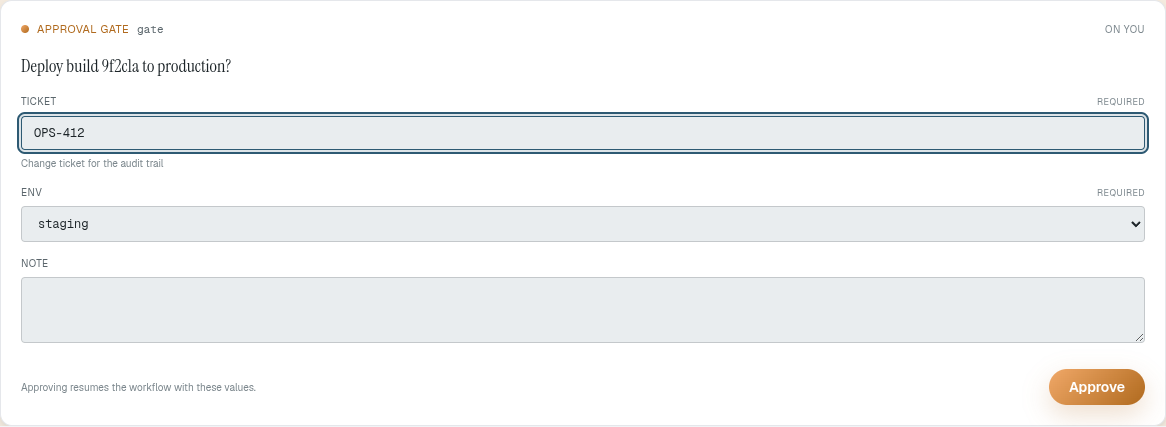
The header carries the run id, workflow type, status, a cancel button (live runs) or a rerun button (terminal runs), a manual refresh, and a schedule deeplink where one applies. An approval form appears here when the run is waiting on a signal: its fields come from the YAML approval spec, and a bare polyglot signal falls back to a generic name + payload form.
-
On a failed run, a banner at the top of the page names the failing step with its error and a tail of its log.
-
cryo annotatenotes render below that as sanitized markdown, sorted by severity with errors first. -
For YAML runs, a job strip shows one chip per job and its status at a glance.
-
Timeline - vertical waterfall of spans derived from the event log: one bar per activity/sleep/wait, sized by duration, with queue-delay and execution segments distinguished.
-
Activities (fan-out) - fan-out view for scripts that call
cryo activity-submit. Polyglot fan-out children are tracked separately fromworkflow:child runs, so this panel lists them on their own. Filter chips (all/failed/running/done) and failures-to-top sort. -
Live activity - per-step live output panes while the run executes. The merged live-log stream is split into one pane per activity; the server emits a keepalive every 15s on quiet streams and the page reconnects losslessly while the run is live.
-
The event list reveals structure rather than flattening it: workflow body events render as nested rows, and a child workflow renders inline at its spawn point, a few levels deep before it links out to the child’s own page. Per-step terminal panels show captured stdout with ANSI colors.

/canvas, /canvas/:name
Section titled “/canvas, /canvas/:name”The graph editor. /canvas lists stored graphs; /canvas/:name
opens one for authoring - a node palette, a per-node inspector with
labeled fields and help, live validation, expression autocomplete,
and draft/publish/run controls with a live run overlay. Full guide:
Authoring on the canvas.

Editing one is live in both directions - the canvas, the inspector and the JSON document underneath are the same graph:
/schedules, /schedules/:id
Section titled “/schedules, /schedules/:id”List and detail views for cryo schedule-managed recurring
workflows. Both pages carry the same fields, so anything you can edit
you can also start: a script, a YAML pipeline, a stored graph by name,
or a single node kind, with cadence, timezone, overlap, jitter, label
and tags. The detail page also shows what a schedule runs and edits it
in place. An edit keeps the schedule’s id, so its run history stays
attached.
Both pages have Run now, which fires the schedule once and opens the run it started. It leaves the cadence where it is and works on a paused schedule, so it is the way to try a body out without waiting for its next deadline or disturbing it. If runs of that schedule are already going it starts nothing and lists them, with Run alongside to start one anyway.
/events
Section titled “/events”The project event bus: recent events with type, id, emitter, and
payload. Events the platform mints get a muted chip - the built-in
trigger types (push, manual, schedule.tick, spawn) and the lifecycle
types every run emits when it finishes (run.succeeded, run.failed,
run.cancelled). Custom cryo emit events and forwarded forge events -
the ones a handler routes on - stand out. Handlers match by event type,
so any of these can be subscribed.
/connections
Section titled “/connections”Two things for the active project:
- Event-hooks - inbound webhooks that emit a bus event per
delivery, which a
cryo handleror a graph trigger runs on. Create / list / delete them, and register one on the forge (GitHub / Gitea / Forgejo) given a repo and a forge admin credential, instead of pasting the URL + secret into repo settings. - Connector credentials - typed auth (bearer / api-key / basic) that canvas http and connector nodes reference by name. Write-only: values become request headers at dispatch and never come back out.
To trigger runs from a repo push, a canvas webhook trigger node provisions its own endpoint; see CI from a repo.
/agents
Section titled “/agents”Agent registry: heartbeat status, sort, forget. Mostly useful for dev / debugging.
/projects
Section titled “/projects”Projects in the org: create one, switch the active project, or delete one. Deletion is destructive - it cascades everything project-scoped, so it’s armed per row and requires re-typing the slug.
/members
Section titled “/members”Manage access by email in two scopes: org-wide members and members of the active project. Each row assigns a role; granting an email that has no account yet creates an invite.
/settings
Section titled “/settings”Manage your personal access tokens: mint a new one (shown once), list existing ones, and revoke.