
Events and handlers
A project has an event bus. A workflow emits an event; handlers react to it. A handler is a workflow you register to run when an event of a given type fires - so routing logic lives in a workflow (a script, a pipeline, or a canvas graph) instead of a fixed subscription table. A project can have many handlers, each matching the event types it cares about.
What a bus event is
Section titled “What a bus event is”An event is a project-scoped record with three parts:
type- a discriminator string (e.g.deploy-done,run.failed).key- its subject: the thing the event is about (a repo, a PR, a deploy). Optional; a subjectless event is a broadcast. See Subjects.payload- arbitrary JSON.
Recording an event is append-only, so the bus reads like a log. Both the platform and your workflows emit onto the same bus.
Emitting
Section titled “Emitting”Any workflow can emit, in any language: cryo emit from a shell step or a
polyglot script, emit() from the language SDKs, or an emit node on a
canvas graph.
Each emit is checkpointed by its position, so re-running the code that
emitted it - a script replaying after a suspend, a step re-dispatched after
its agent dropped it, a retry: attempt - resolves to the same event rather
than publishing a second one. Note what that means for a retry: the event
the first attempt recorded is the one that stands, payload and all, so a
later attempt emitting the same position with a different payload does not
replace it.
Position is what makes this work, so an emit needs to sit at the same point
in the code each time. In a polyglot script the surrounding cryo step
memos hold the control flow steady. A YAML shell step has no such memos and
re-runs from the top against the live world, so keep its emits at a fixed
place in the script rather than inside a loop whose length can change
between attempts.
cryo emit deploy-done --payload '{"env":"prod","sha":"abc123"}'cryo emit deploy-done --key acme/web --payload '{"env":"prod"}'cryo emit cache-warm # payload defaults to JSON null--key sets the event’s subject (see Subjects). Omit it
and the event is a broadcast - it reaches every reaction watching that
type. cryo emit also works from a terminal, where it posts to the
server - the way to unblock a wait_for_event: job or trip a
cancel_on: by hand.
--payload must be valid JSON. The type is validated: 1-64 characters of
[A-Za-z0-9._-]. Some types are reserved for the platform and rejected:
push, manual, schedule.tick, spawn name built-in trigger envelopes,
and the run.* and cryo.* namespaces are platform-emitted (see
lifecycle events). Reserving them means a handler
that trusts run.failed to mean a real run failed can’t be fooled by a
forged emit.
To see recent events in a project, and one event’s full payload:
cryo events ls# deploy-done dev:default:evt-... by dev:default:run-... {"env":"prod"}cryo events show dev:default:evt-1a2b3c4d5e6f7a8bOne event, many listeners
Section titled “One event, many listeners”An event is broadcast. Every reaction watching its type is notified by the same event, and they do not compete for it - one emit wakes all of them, each with the whole envelope. The four ways to listen can be waiting on one type at the same moment, in one project, and all four fire:
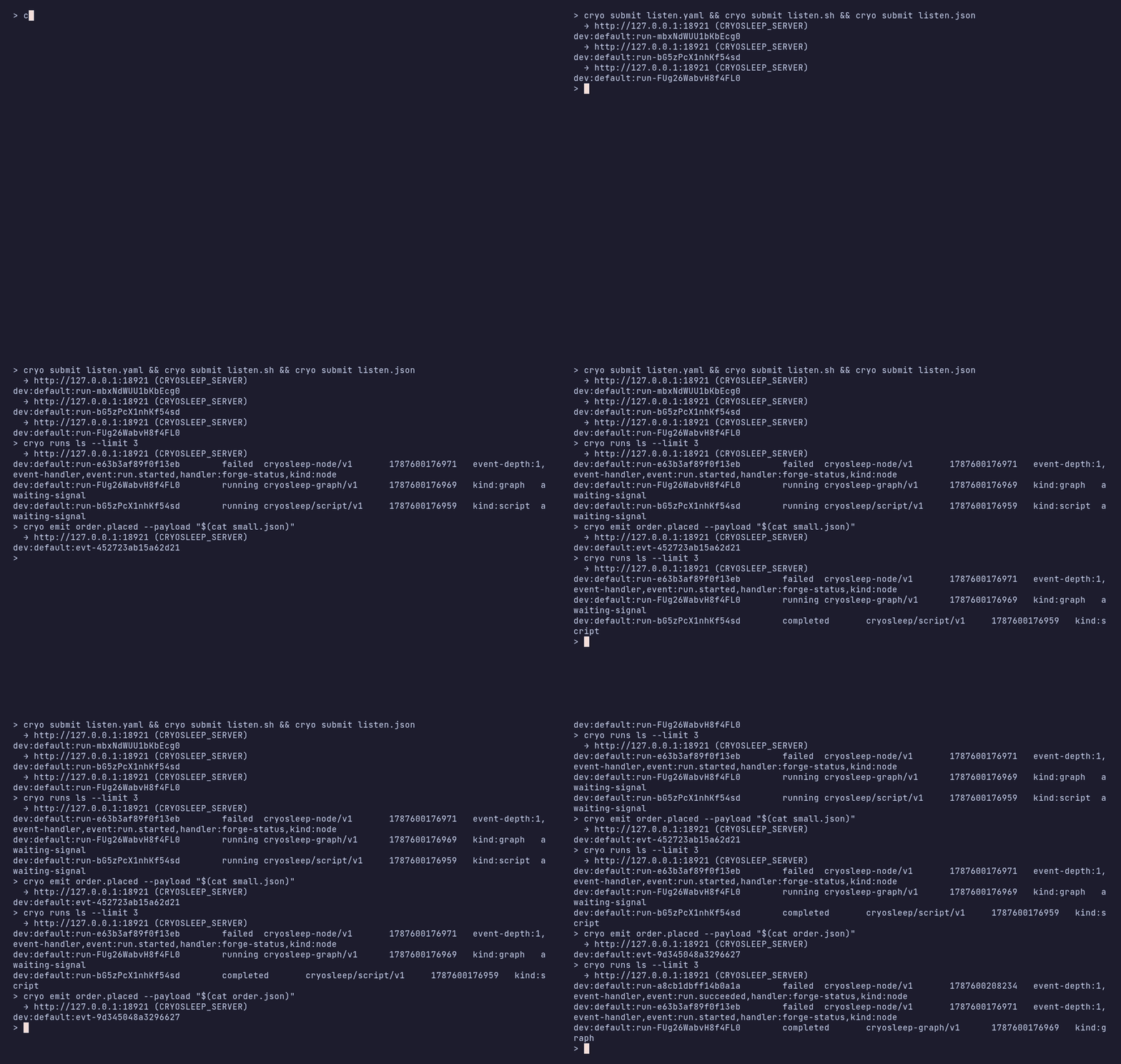
# waiter.yaml - a pipeline parks a job on itname: yaml-waiterjobs: hold: wait_for_event: event: order.placed when: ${{ event.payload.qty > 10 }} ship: depends_on: [hold] steps: - name: ship run: echo "ship ${{ steps.hold.output.payload.sku }}"# waiter.sh - a polyglot script suspends on it, and has no predicate:# `wait-event` returns the first order of any size, and the script# decides afterwards, by which point that wait is spent.set -eev="$(cryo wait-event order.placed)"[ "$(echo "$ev" | jq -r .payload.qty)" -gt 10 ] || exit 0cryo step "ship" -- ship-it "$(echo "$ev" | jq -r .payload.sku)"// waiter-graph.json - a graph node parks on it{ "version": "cryosleep-graph/v1", "nodes": [ {"id": "hold", "type": "event", "config": {"event": "order.placed", "when": "event.payload.qty > 10"}}, {"id": "ship", "type": "code", "config": {"script": "echo \"ship ${SKU}\"", "env": {"SKU": {"$expr": "nodes.hold.output.payload.sku"}}}} ], "edges": [{"from": "hold", "to": "ship"}]}# a handler starts a fresh run per event, and filters before it doescryo handler set big-orders ./handler.sh \ --on order.placed --when 'event.payload.qty > 10'Submit the first three, register the handler, then emit once:
cryo emit order.placed --payload '{"sku":"TENT-2P","qty":12}'All four react to that single event: the parked pipeline job resumes,
the script’s wait-event returns, the graph’s event node completes,
and the handler starts a new run. Send a small order first and only the
script reacts - the two predicates decline it and keep waiting, and the
handler never starts.
Reading the event, and filtering on it
Section titled “Reading the event, and filtering on it”Each context hands you the whole envelope; they differ in where you read it from and where a predicate can go.
| Waits with | Reads the event as | Filters with | |
|---|---|---|---|
| YAML pipeline | a wait_for_event: job |
${{ steps.<job>.output.payload.… }} |
when: on the wait |
| Graph | an event node |
{"$expr": "nodes.<id>.output.payload.…"} |
when: on the node |
| Polyglot script | cryo wait-event <type> |
the envelope on stdout | whatever the language has (jq, a case) |
| Handler | cryo handler set --on <type> |
$CRYO_INPUT_FILE, or input.payload.… |
--when '<CEL>' |
Where the predicate runs is the thing to get right. A handler’s
--when runs before anything starts, so a non-matching event creates
no run and costs nothing. A wait’s when: runs against a run that
is already parked: an event it declines leaves the wait in place, so
the run keeps waiting for one it wants
(below). A script has no predicate at
the wait - cryo wait-event returns the next event of its type and
the script decides afterwards. An event it doesn’t want is consumed
either way, though it can wait again for the one after it.
Put the test in a handler when most events are not for you and each one that is should start fresh work. Put it on the wait when a run is already halfway through and waiting for its turn.
Once a run has the event, an if: on a downstream job or node is
how you branch on what it contained - ${{ steps.<job>.output.payload.… }}
in a pipeline, nodes.<id>.output.payload.… in a graph. That is a
different question from when:, which decides whether the wait ends at
all.
How much of the event arrives
Section titled “How much of the event arrives”All of it. The payload reaches a listener whole - a script’s
cryo wait-event prints the entire envelope, and $CRYO_INPUT_FILE
is never truncated however large the payload.
The bound is on the way in: an emit is an HTTP request body, capped at
2 MiB. A larger one is refused at the door with 413, so no listener
ever sees a half-event. Platform run.* events cap their error and
reason text at 4000 characters (keeping the tail, where the real
error is) so the rest of the lifecycle payload always fits.
Events are for notifying, not for moving data. Past a few hundred KB, put the bytes in an artifact or object store and emit the reference.
Lifecycle events
Section titled “Lifecycle events”Every run publishes a lifecycle event when it starts and another when it finishes, whatever its kind (pipeline, script, or graph):
run.started- payload{run_id, status, workflow, …}run.succeeded- addsoutputrun.failed- addserrorrun.cancelled- addsreason
All four also carry:
tags- the run’s tags, andtag, a map of thek:vones, so a handler routes onpayload.tag.shawithout a second lookup.trigger- what started the run, when it was event-triggered:type,sha,ref,repo,sender,forge. A manual submit has{"type": "manual"}, so test the field you are about to read (has(event.payload.trigger.repo)) rather thantriggeritself.run_url- a link to the run, when the deployment setsCRYOSLEEP_PUBLIC_URL. Absent otherwise rather than guessed.
Subscribe a handler to run.failed to notify on failures, to
run.succeeded to fan out on completion, or to run.* for all four.
These are the platform’s events, so you can’t emit them yourself - a
run.failed on the bus always means a run actually failed.
run.* includes run.started. A handler written when the set was
three terminal events fires twice as often now, once at the start and
once at the end. List the three explicitly (--on run.succeeded,run.failed,run.cancelled) if you want terminal-only.
run.started is announced when a run starts, so a run held in a
concurrency
queue announces when it is promoted, not when it was accepted.
A lifecycle event carries the finishing run’s subject (see Subjects), so a run that waits on a specific upstream completion matches that one, not any run that happened to finish.
Forwarded forge events
Section titled “Forwarded forge events”A registered webhook forwards every non-push delivery as a bus
event typed github.<event> - github.issue_comment,
github.pull_request, and so on - so a handler can react to PR comments,
review states, or issues the same way it reacts to a cryo emit.
Deliveries are signature-verified and deduped before forwarding; a forge
redelivery resolves to the same event, not a duplicate. Pushes arrive as
the push event type.
Which events arrive is controlled on the forge side. An auto-registered
webhook (--auto-register) subscribes to push plus the actionable set:
issues, issue comments, pull requests, PR reviews and review comments,
and releases. A manually-created hook sends whatever you tick in the
forge’s settings - anything it sends gets forwarded.
Inbound webhooks: external deliveries on the bus
Section titled “Inbound webhooks: external deliveries on the bus”cryo emit is one way onto the bus. The other is an event hook: a named
inbound HTTP endpoint that turns a delivery from an outside system into a
bus event, so a cryo handler whose --on matches that event type runs.
cryo event-hook set billing --event-type payment.settledset prints the ingest URL, a shared secret shown once, and a curl that
uses both. Only the secret’s digest is stored, so a lost one is replaced
rather than recovered: cryo event-hook rotate <name> mints a new one and
the old one stops working. The sender presents the secret in the
X-Cryo-Hook-Secret header:
curl -X POST "$INGEST_URL" \ -H "X-Cryo-Hook-Secret: $SECRET" \ -H 'content-type: application/json' \ -d '{"sku": "TENT-2P", "qty": 12}'# 202 {"event_id":"dev:default:evt-…","event_type":"…"}A ?secret=<secret> query parameter works too, for a sender that can’t
set headers - but it puts the secret in browser history, proxy logs and
referrers, so prefer the header wherever you have the choice. Without
either, ingest answers 401 and the body says which header it wanted.
The delivery arrives as {"body": …, "query": …} under payload, so a
handler reads a posted field as input.payload.body.<field> and a query
string one as input.payload.query.<field>. Query values are always
strings; body values keep their JSON types. A POST with no body at all -
curl -X POST "$INGEST_URL", the shape a doorbell or a button sends -
arrives as an empty object, so .payload.body.temp finds nothing rather
than failing on a string. A body that isn’t JSON (form-encoded, plain
text) arrives verbatim as a string, so guard when you expect one of
those: .payload.body.temp? // .payload.query.temp? // 80 in jq.
Three verification modes decide what counts as a valid delivery:
- a shared token (
--event-type <type>), presented on every delivery, which emits that one type; - a built-in manifest (
--manifest github --key <signing-key>), which verifies the signature, shapes the payload, and derives the emitted type per delivery; - manual HMAC (
--hmac-header/--hmac-key/--hmac-prefix) for a sender whose signing scheme you describe yourself.
cryo event-hook ls, show <name> and rm <name> manage them. The
delivery becomes an ordinary bus event, so whatever subscribes to that
type runs.
Or let a graph own the endpoint
Section titled “Or let a graph own the endpoint”A webhook trigger node mints its own hook
when the graph is published and subscribes the graph to it. Same machinery
underneath: the endpoint is an event hook, it appears in
cryo event-hook ls as graph.<graph>.<node>, and its deliveries land on
the bus like any other. So both shapes can feed any number of subscribers -
the choice is about who owns the endpoint, not what can read it.
The default is simple: if a graph is the thing you want run, give it a
trigger node. The endpoint is then part of the graph - one verb to set
up, and nothing left behind when the graph goes. Create a hook yourself
when the bus is the consumer: several graphs, a cryo handler script,
or subscribers you haven’t written yet.
Where that isn’t obvious, three things decide it:
- How many URLs the sender has to know. A hook you create is one endpoint that fans out to every subscriber. Trigger nodes give one endpoint per graph, each registered with the sender separately. Ten graphs reacting to one repo is ten forge webhooks, or one.
- Whether the endpoint should outlive the graph. A trigger’s endpoint is minted and reaped by publishing: drop the node and the URL and secret go with it, which is clean teardown. A hook you created stays until you remove it, which is what you want when re-pointing the sender is slow or out of your hands.
- Whether the name should be neutral. A hook you name emits
billing.*; a trigger’s emitsgraph.<graph>.<node>.*, keyed to that graph’s node. Subscribing something else to that is reaching into another graph’s front door.
Catching a repo push to run that repo’s pipeline is the owned kind - one graph, one sender, teardown with the graph. CI from a repo walks it through.
Subjects
Section titled “Subjects”An event’s key is its subject - the thing it’s about. A forge webhook
sets it to the repo (acme/web), so ten repos on one project emit push
and pr.closed events that are the same type but distinguishable by
subject. A cryo emit sets it with --key. Lifecycle events carry the
finishing run’s subject.
The subject earns its keep through inheritance. When an event starts
a run, the run inherits the event’s key as its subject. A run-scoped
reaction the run registers - a cancel_on: or a wait_for_event: -
then correlates to that subject automatically. So a CI run started by a
push to acme/web has subject acme/web, and its cancel_on: [pr.closed] fires only when acme/web’s PR closes, not another repo’s.
You write nothing about the correlation; the subject carries it. One
graph, ten repos, no per-repo duplication.
Two rules keep this predictable:
- The producer sets the subject, once. The webhook composes it from
the delivery (the repo);
cryo emit --keysets it explicitly. A consumer never digs it out of the payload - it matches a clean key. - An unkeyed event is a broadcast. An event with no subject reaches
every reaction watching its type, whatever their subject. That is how a
project-wide signal works:
cryo emit deploy.freeze(no--key) cancels every run whosecancel_onwatches it. A subject only ever narrows delivery, and only for events a producer chose to key.
A handler’s when: predicate can read the subject as event.key, so a
handler can filter on it even though handler matching itself is by type.
How far the subject narrows, and where it stops
Section titled “How far the subject narrows, and where it stops”A forge webhook sets the subject to the repo, and that is the whole of
it: there is no per-PR or per-commit key. So the narrowing is
repo-level and nothing finer. In a repo with five open PRs, all five CI
runs carry subject acme/web, and one pr.closed fires the
cancel_on: on all of them, whichever PR closed. A
wait_for_event: is the same - a run waiting on deploy.approved is
resumed by any approval in the repo.
Two things follow for how to write this today:
-
To supersede a run per branch or per PR, use a concurrency group rather than
cancel_on:.group:takes${{ }}holes, so it names the thing being serialized as precisely as you like, andpolicy: cancel-runningreplaces the previous run for that same key when a new one arrives:concurrency:group: 'ci-${{ has(input.ref) ? input.ref : "manual" }}'policy: cancel-runningThat is the per-PR “stop the old run” behaviour, and it correlates to the run itself, because the group is computed from the run’s own input.
-
To decide on the event’s contents, give the wait a
when:. Await_for_event:job and a grapheventnode both take a predicate over the envelope, so a wait accepts the events it is for and lets the rest go by (below). A handler’s--whendoes the same job one level earlier, before a run exists.
cancel_on: has no predicate: it is a whole-run reaction, so reserve
it for events that are genuinely repo-wide - a deploy.freeze that
should stop everything - rather than for “cancel the run for this PR”,
which is a concurrency group.
Declining an event: when:
Section titled “Declining an event: when:”A wait takes the first event of its type, and that is rarely what you mean when several are in flight. Give it a predicate and it accepts only the events it is for; the rest reach it, are declined, and it goes on waiting:
jobs: hold: wait_for_event: event: order.placed when: ${{ event.payload.qty > 10 }} ship: depends_on: [hold] steps: - name: ship run: echo "shipping ${{ steps.hold.output.payload.sku }}"A graph event node takes the same predicate, as bare CEL:
{"id": "hold", "type": "event", "config": {"event": "order.placed", "when": "event.payload.qty > 10"}}The scope is one name, event - the same envelope a handler’s
--when and a pipeline’s top-level if: read. A ${{ … }} wrapper is
accepted in YAML and stripped; the expression is evaluated in the
control plane against an event the run has not seen, so it is never
resolved like a ${{ }} hole in a step.
A few specifics:
- Declining is private to that wait. Every other listener still receives the event, predicate or not. One run’s filter is not a project-wide one.
timeout:is unaffected. The deadline runs from the first park, so a stream of declined events does not extend it. A wait that declines until its deadline times out exactly as one that saw nothing.- A predicate that cannot be evaluated declines the event, and says
so in the server log. Reading a field the event does not carry is an
error, so guard anything optional:
has(event.payload.qty) && event.payload.qty > 10. Without the guard, every event of that type is declined and the run waits until itstimeout:. A predicate that will not compile is refused earlier, whencryo checkruns. - The scope is
eventand nothing else. A predicate cannot read the run’s own state - nosteps.*, novars. It is evaluated in the control plane before this run is involved. To correlate a wait with something the run computed, put that value in the event’s subject and let the subject match.
Without a when:, a wait behaves as it always did: the first event of
its type resumes it, whatever it contains. A downstream if: is not a
substitute - by the time it runs, the wait has already been spent.
Handlers
Section titled “Handlers”A handler runs a workflow when a bus event matches its type patterns. A project can have many, each with a name. The workflow is a polyglot script, a YAML pipeline, or a stored canvas graph.
cryo handler set ci ./router.sh --on push # script, on pushescryo handler set notify ./alert.sh --on run.failed # a failure notifiercryo handler set release ./rel.yaml --as=yaml --on pushcryo handler set report --graph weekly --on run.* # a stored graphcryo handler set status --node github.report_run_status \ --config '{"credential":"forge"}' --on run.* # one node kindcryo handler ls # list themcryo handler show ci # print onecryo handler rm notify # remove one--tag applies tags to every run the handler spawns; --requires adds
agent capabilities on top of the base one (polyglot for a script
handler). Stuck at a blank file? cryo handler init prints starter
router scripts you edit and register.
A script handler can pull project credentials into its environment
with --credential ENV_VAR=credential_name (repeatable): the named
credential’s value is resolved from the project’s credential store and
injected as that env var when the run is claimed, masked in logs. A yaml
or graph handler names its own credentials instead (a pipeline job /
graph node), so --credential is script-only.
An untrusted delivery never sees a secret, and a handler that asks for
one fails rather than running without it. So a handler registered
with --credential does not serve fork pull requests at all: to give
outside contributors feedback, register a second handler that asks for
no credential, or move the privileged work into a graph and gate it on
run.untrusted.
cryo handler set ci ./router.sh --on push \ --credential GITHUB_TOKEN=github-statusMatching: the on: list
Section titled “Matching: the on: list”--on is a list of event-type patterns:
- an exact type -
push,run.failed,deploy-done - a prefix wildcard -
run.*matchesrun.started/run.succeeded/run.failed/run.cancelled *- every event
An event delivers to every handler whose patterns match its type, and
each match spawns one run. So run.succeeded reaches only handlers that
asked for it; a busy project doesn’t spawn a run for handlers that don’t
care.
Filtering on content: the when: predicate
Section titled “Filtering on content: the when: predicate”--on matches the event type; --when filters on its content. It’s a
CEL expression evaluated against the event before the handler fires - when
it’s false the event is recorded but the handler doesn’t run. One name is
in scope: event, the whole envelope - event.type, event.key (the
subject), event.payload, and for a push the fields the source shaped
onto it (event.ref, event.sha, event.repo, event.sender,
event.paths, event.paths_known). It is the same scope a pipeline’s
top-level if: sees.
A push carries the files it changed, so a handler can skip work when nothing relevant moved - a CI router that ignores docs-only pushes:
cryo handler set ci ./router.sh --on push \ --when 'event.paths.exists(p, !p.startsWith("docs/"))'event.paths is the sorted set of files the push added, modified, or
removed. event.paths_known is false when the forge didn’t send a file
list; write the predicate to run in that case rather than skip -
'!event.paths_known || <your test>' - so an unknown set never silently
drops a build. A handler with no --when fires on every type match.
A handler matching push is authoritative for pushes: the push runs
that handler instead of the webhook config’s inline pipeline - exactly
one executor per push, never both. The webhook config keeps transport
duty (signature, dedup, repo identity). Drop the handler and the inline
pipeline resumes. A handler routing pushes reads the ref, commit and repo
off the envelope it was handed - event.ref, event.sha, event.repo -
the same value a graph node reads as input. Clone and dispatch from
those.
Every trigger is recorded on the bus - pushes, schedule ticks, and manual
submits all show up in cryo events ls alongside custom and lifecycle
events.
What a handler receives
Section titled “What a handler receives”A script handler runs with the event in a file, named by
$CRYO_INPUT_FILE; a shell step reads the same file. For a cryo emit
event the envelope is:
{ "type": "deploy-done", "event": "dev:default:evt-1a2b3c4d5e6f7a8b", "payload": { "env": "prod", "sha": "abc123" }}event is the bus id. The file holds the whole envelope, whatever its
size - a forwarded forge push is tens of KB and arrives intact. It is
written into the run’s scratch directory and can’t be shadowed by a
workflow’s own env:.
The handler reads it, switches on .type, and acts:
#!/usr/bin/env bashset -euevent="$(jq -r .type "$CRYO_INPUT_FILE")"case "$event" in run.failed) cryo step notify -- alert "$(jq -r .payload.error "$CRYO_INPUT_FILE")" ;; deploy-done) cryo step publish -- announce "$(jq -r .payload.sha "$CRYO_INPUT_FILE")" ;; *) echo "ignoring $event" ;;esacFor the handful of fields worth branching on without reaching for
jq, the same envelope’s scalars arrive as environment variables:
$CI_TRIGGER_EVENT (the type), $CI_TRIGGER_EVENT_ID (the bus id),
and one per scalar field the envelope carries - $CI_TRIGGER_SHA,
$CI_TRIGGER_REF, $CI_TRIGGER_REPO, $CI_TRIGGER_SENDER,
$CI_TRIGGER_SHORT_SHA. Nested objects and lists have no flat form and
stay in the file.
A pipeline handler doesn’t read the file at all - the same envelope
is its input expression scope, so it writes ${{ input.type }} and
${{ input.payload.sha }} directly. That scope is uncapped too.
A graph handler receives the event as its run input instead of an
env var - nodes read it through expressions (input.type,
input.payload.error). A canvas graph declares which events start it
with trigger nodes, which register the handler for you on
publish.
One event produces one run per matching handler. The run id is derived from the event id and the handler name, so a replayed emit resolves to the same run instead of starting a second one.
Chaining and the loop guard
Section titled “Chaining and the loop guard”An event-triggered workflow can drive the next one: a handler’s own
cryo emit of a custom event delivers to matching handlers, one
generation deeper. So a run.failed handler can emit deploy.blocked to
trigger a rollback workflow.
What doesn’t chain is a handler run’s lifecycle re-emit. When a
handler finishes it emits run.succeeded/run.failed like any run, but
those are recorded and not re-delivered - otherwise a run.* handler
would re-trigger on its own completion forever. Lifecycle events from
ordinary (non-handler) runs deliver normally; that’s what makes the first
notification fire.
Delivery bounds
Section titled “Delivery bounds”Two ceilings keep an emit storm from turning into unbounded durable work. Hitting either fails the emit, so the emitting workflow sees the error and applies backpressure rather than events piling up silently.
- Chain depth: a custom-emit chain may run at most 5 generations deep. Past that it’s treated as a routing loop and delivery is refused.
- Concurrency: a project allows at most 16 handler runs in flight at once. Beyond that, delivery is refused until the backlog drains.
Delivery guarantees
Section titled “Delivery guarantees”Delivery is at-least-once. Recording an event and submitting the run are idempotent on the event id, but a retried emit (from a workflow that failed after emitting) can record a second bus row for the same logical event. Handlers should tolerate a duplicate.
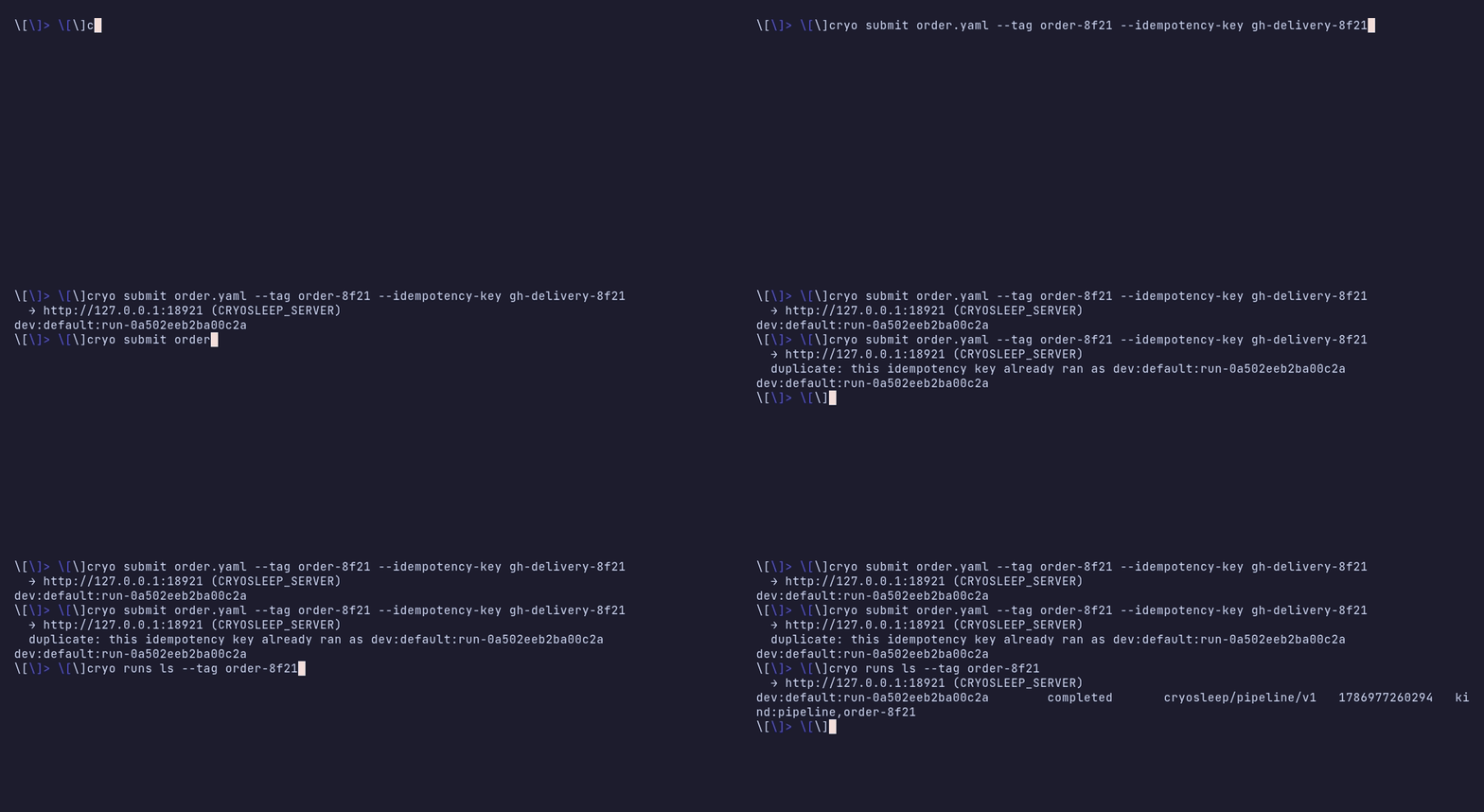
Something calling the submit API directly - your own webhook receiver, a script in someone else’s CI - has a cheaper answer than tolerating it. Pass the sender’s delivery id as an idempotency key:
cryo submit deploy.yaml --idempotency-key "$GITHUB_DELIVERY"The key derives the run id, so a redelivery is answered with the run the
first one made and no second run is created, admitted or counted. The
second submit answers 200 with duplicate and hands back that run’s id,
so a caller that polls has something to poll either way:
That is a different tool from the dedup ledger, which is for duplicates a run discovers about its own work; the key is for duplicates the caller already knows about.
There is no per-project ordering guarantee. Events are delivered as they arrive; two emits close in time may run their handlers concurrently and finish in either order.
Discovering what to subscribe to
Section titled “Discovering what to subscribe to”You don’t have to know an event type by heart - the
event catalog lists what’s available: the platform’s
own types (run.*, push, schedule.tick), types a project graph declares
by emitting them, and types already seen on the bus (with a sample
payload). Subscribing to a type that has never fired is fine: a handler’s
on patterns match by type, so the registration sits ready and fires the
first time the type appears.
Where events route to work
Section titled “Where events route to work”A handler is the one place events route to work, and it already runs your
code (in any language) with the event in hand, where it can cryo spawn a
pipeline or a script, call a connector, or do the work inline. There’s no
separate listener to run - the platform invokes the handler once per
matching event, and each run is a durable workflow, so a crash mid-route
re-dispatches and replays rather than dropping the event.
That’s the durable answer to “react to a stream of events and start
workflows”: register a handler, act from it. The agent socket is
request/response and only exists inside a running activity; wait_event
inside a workflow parks the run until one event arrives (a durable
suspension, not a live feed). A long-lived external listener would be
non-durable - while it’s down, events need buffering, acking, and replay,
exactly the machinery a handler gives you because the platform owns the
waiting.