
cryo CLI reference
cryo is the user-facing CLI and the in-script polyglot SDK rolled
into one binary. The two contexts share global flags but expose
different subcommands.
Global flags
Section titled “Global flags”--server <url> cryosleep server URL (default $CRYOSLEEP_SERVER)--local require a running local `cryo dev` (never the configured server)--hosted target the configured (logged-in) server even if a `cryo dev` is up--org <slug> active org (default $CRYOSLEEP_ORG)--project <slug> active project (default $CRYOSLEEP_PROJECT)$CRYOSLEEP_TOKEN provides the bearer token for authenticated
calls. cryo login writes org/project/server into
~/.config/cryo/config.toml so subsequent calls don’t need any
flags or env vars.
Which server a command targets
Section titled “Which server a command targets”Server-facing commands resolve their target in this order:
--server/$CRYOSLEEP_SERVER first, then --local/--hosted, then a
running cryo dev (found automatically), then your logged-in
config.toml, then the built-in default. So while a local cryo dev
is up, commands hit it - not the hosted control plane - unless you pass
--hosted or --server. Each command prints its resolved target
(→ local dev … / logged in / configured / default); run cryo where to see it without running anything.
Inside a job, an unnamed target is refused
Section titled “Inside a job, an unnamed target is refused”A job’s environment carries the agent socket, the run id and the activity id. It carries no server URL and no token, deliberately: the in-job subcommands go over the socket and need neither.
So a server-facing verb called from inside a job - cryo logs,
cryo cancel, cryo submit - has nothing to resolve, and the last two
steps of the order above would hand it whatever this machine holds:
your logged-in control plane on a laptop, the built-in default in a
container. That is a different deployment from the run the job belongs
to, reached with credentials the job was never given, and it answers
like a success - an empty list, a 404.
Those calls are refused instead, with an error saying so. To let a job
talk to a control plane on purpose, name it in the job’s env::
jobs: report: env: CRYOSLEEP_SERVER: https://api.example.com CRYOSLEEP_TOKEN: ${CRYO_REPORT_TOKEN} # a project secret script: | cryo runs ls --tag release --limit 5cryo where still answers inside a job, and says that the target it
printed came from the machine rather than from the run.
Reading runs from inside a job
Section titled “Reading runs from inside a job”Four verbs need no server at all inside a job, because they read the run’s own project over the socket:
| Verb | Answers |
|---|---|
cryo status <run> |
state, name, tags, timing, what it’s waiting on |
cryo events <run> |
the run’s history - where an approval’s answer and answerer are |
cryo runs ls [--tag T] [--limit N] |
the project’s runs |
cryo runs annotations <run> |
what a run has written on itself |
jobs: report: depends_on: [build, test] steps: - name: summarise run: | cryo status "$CRYO_WORKFLOW_ID" cryo runs ls --tag release --limit 5The scope is the project, and the server decides it from the activity
the job is claiming - not from anything the job sends. A run id from
another project is refused rather than answered empty, so “no such run”
never means “you asked the wrong place”. CRYO_WORKFLOW_ID is this
run’s id, available in shell steps and scripts alike.
These reads are not durable. Two calls can give two answers, and a
replay a third; nothing about them is recorded. Anything the run decides
on has to go through cryo step, which records what it saw, or a
state cell.
Two limits worth knowing:
- A job that was given a server in its
env:keeps reaching that server. These verbs only take the socket path when there is no named target - a server you named on purpose is not silently redirected. - A run marked
untrusted-event- one started by a fork PR or an outside contributor - reads nothing. It is already denied every secret and credential, and reading the project’s other runs is denied on the same grounds.
Server-API subcommands
Section titled “Server-API subcommands”Run from any shell; talk to a running cryosleep server.
Answering an approval gate, which asks for each field the gate declares, with its type and its options:
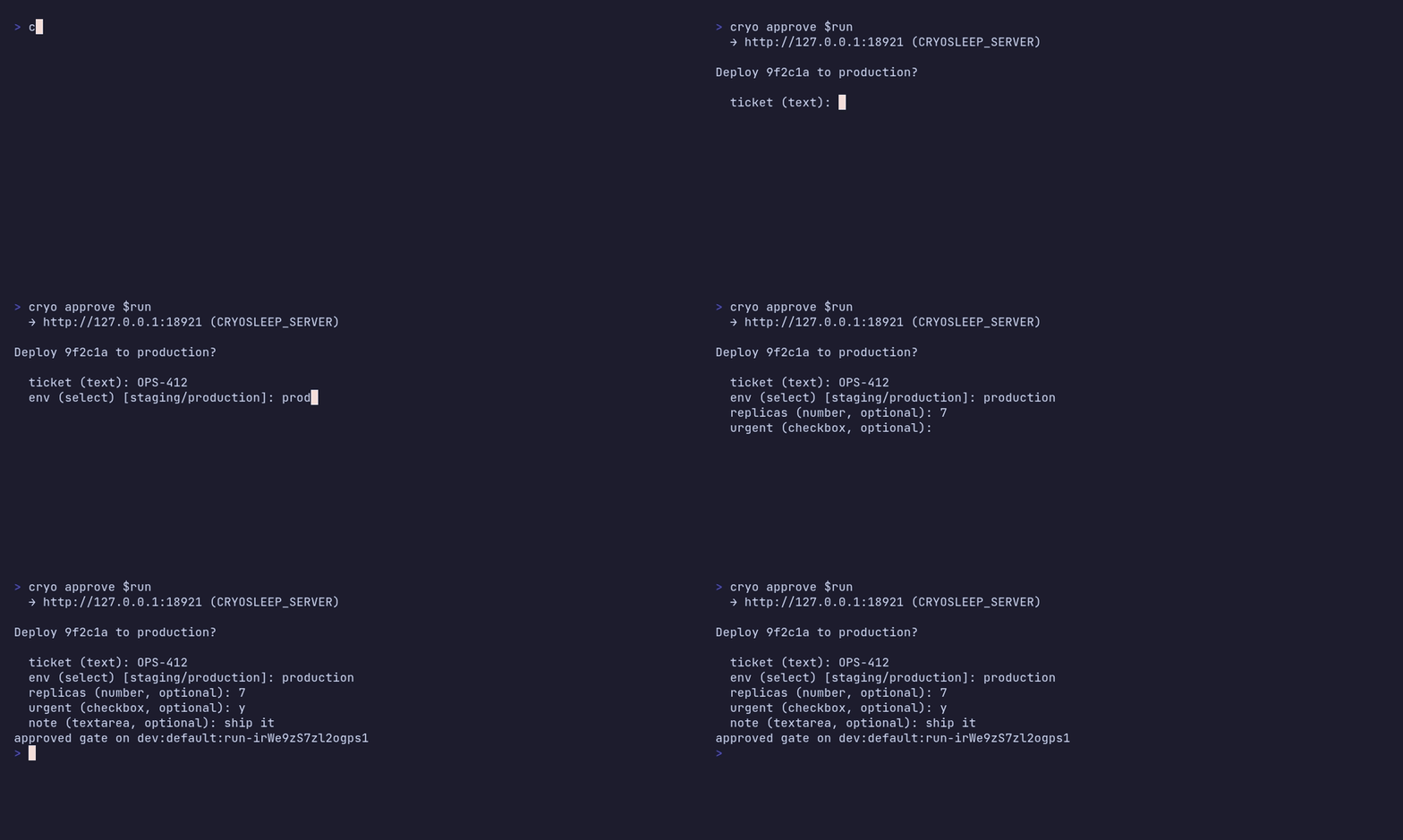
The same gate from cryo follow, without leaving the run you’re
watching - select the parked wait, press a:

| Subcommand | Purpose |
|---|---|
cryo submit <file> [--as=yaml|script|graph] [--input <json>] [--follow|-f] [--tag <t>] |
Submit a pipeline (.yaml), a graph (JSON or YAML, recognised by its version: cryosleep-graph/… marker), or a polyglot script; --input supplies the run input; --follow opens the TUI on the new run |
cryo submit … [--concurrency-group <g> [--concurrency-policy queue|cancel-running|cancel-queued|skip] [--concurrency-queue-max <n>]] [--cancel-on <event>]… |
Request-level admission: one running run per group (queue behind it, cancel the running/queued members, or skip and create nothing) and/or cancel this run when a bus event arrives. Works for scripts and pipelines alike; wins over the YAML concurrency:/cancel_on: blocks |
cryo submit … --idempotency-key <k> |
Dedupe the submit: the key derives the run id, so a redelivery carrying the same one answers 200 with the original run instead of starting a second. Prints that run’s id, so --follow follows the run that happened |
cryo submit … --throttle <limit>/<period> [--throttle-key <k>] [--throttle-burst <n>] [--throttle-policy queue|drop] |
Rate admission for this run - the request-level twin of the pipeline throttle:, and the only way a submitted script, graph or node run gets one. Outside a pipeline there is no name: to count under, so --throttle-key is required. cryo call node / cryo call graph have no throttle flag; reach the raw API for those |
cryo submit --repo-path <p> --repo <owner/repo> --repo-credential <name> [--ref <r>] |
Fetch a pipeline out of a repo at a ref and run it server-side, so the run builds the definition that commit shipped with |
cryo call node <kind> [--config <json>] [--input <json>] [--follow|-f] [--tag <t>]… |
Run one graph node-kind on its own and return its output - a builtin (http, code, shell, …) or a connector action (matrix.send_message). --config is the node config (may carry $expr/$template resolved against --input); both default to {} |
cryo call graph <name> [--version <n>] [--input <json>] [--follow|-f] [--tag <t>]… |
Run a stored graph by name - the published version unless --version pins one; --input is the run input (default {}) |
cryo call graph --definition <file|-> [--input <json>] [--follow|-f] [--tag <t>]… |
Run an inline cryosleep-graph/v1 definition as an awaited durable child, with no publish step - how a job runs work it computed at runtime. - reads the definition from stdin |
cryo graph ls |
The project’s stored graphs, each with its draft and published version - so a graph with edits that were never published says so |
cryo graph put <name> <file|-> [--publish] |
Store a graph definition (JSON or YAML, normalised to the IR) as a new draft version under <name> - the same graph the canvas edits. --publish also points the published version at it so cryo call graph <name> runs it. The name comes from this command, not from any name: in the document; - reads the definition from stdin |
cryo graph get <name> [--version <n>] [--published] |
Print a stored graph’s definition as JSON. Defaults to the current draft (what the canvas shows); --published prints what’s live, --version a specific one. The output round-trips straight back into cryo graph put |
cryo graph show <name> |
The graph’s versions (draft, published) without printing the document |
cryo graph delete <name> |
Delete a stored graph and all its versions (needs Admin on the project, where put and publish need Member). Runs it already produced are untouched |
cryo status <run-id> |
Coarse run status (json) |
cryo runs ls [--tag <t>]... [--limit <n>] |
List recent runs in this project (alias: cryo ls / cryo ps) |
cryo where |
Show which server the CLI targets right now, and why |
cryo runs annotations <run-id> |
List a run’s annotations as JSON |
cryo events show <event-id> |
One bus event with its full payload |
cryo follow <run-id> |
Live TUI for a run (same view submit --follow opens). On a parked wait, s sends a signal and a opens the approval gate’s own form - its prompt and its declared fields, filled in one at a time |
cryo logs <run-id> [--follow|-f] |
Captured logs; --follow tails live, and on a finished run serves the raw byte stream - which is where a retried step’s earlier runs are. The itemised form prints the run that finished each step, and says under it how many there were |
cryo events <run-id> [--follow|-f] |
Durable event log (json or NDJSON) |
cryo steps <run-id> |
The run’s durable step and stepFn checkpoints, as JSON - how you see which checkpoints a replay reused and which re-executed |
cryo activities <run-id> [--failed] |
The run’s polyglot fan-out children, one row per cryo activity-submit, with its exit code. Failures sort first, and --failed drops the rest - a thousand-child run is how you find the three that broke. A whole script is one activity to the event log, so cryo events and cryo steps can’t answer this. Same-named children of two different script activities are suffixed with their parent’s seq |
cryo events ls |
Recent project bus events (cryo emit), newest first |
cryo cancel <run-id> [--reason=<s>] |
Cancel an in-flight run |
cryo rerun <run-id> [--from <node>] [--no-tags] |
Re-submit a terminal run as a fresh run (keeps its canonical input). A rerun re-enters the same admission gates: a pipeline from its document, and a script, graph or node from the concurrency-group: its original carries. cancel-running comes with it, so pressing rerun against a stuck holder still displaces it; skip and cancel-queued fall back to queue, since a rerun is you asking for this run now and those two would either produce nothing or drop runs somebody else is waiting on. queue_max is not reproduced, and neither is a --throttle given at submit, so a rerun of a rate-limited script is not itself rate-limited. --from <node> re-runs that node and everything downstream of it, seeding the untouched upstream nodes with their recorded outputs, so a long run that failed near the end doesn’t repeat completed work or its side effects. For a pipeline the node is a job name: the document is lowered to its graph to resolve it, so that rerun is dispatched as a graph run and carries kind:graph. A run that recorded no node outputs has nothing to seed from and rejects --from, as does a single node call. A SCRIPT accepts it and means something weaker: the point is a cryo step site, the steps before it return the results the original recorded, but the script around them runs again from line one - so anything it does outside a durable call happens a second time. A loop reaches one site many times, so a bare name means the first (dropping every iteration) and site#2 picks a later one - unless a site is literally named that, which wins. --from-family settles a name used by two kinds of call in one script (a cryo wait-signal deploy and a cryo step deploy), which is otherwise refused rather than guessed. --no-tags drops the original’s labels (so a commit-status closer doesn’t fire against an old commit) and keeps its lineage tag and its group - membership is admission, not a label. A rerun of an untrusted run stays untrusted: it is still the same unreviewed content, so it gets no credentials, and --no-tags does not shed the mark either |
cryo signal <run-id> <name> [--payload <json>] |
Deliver a signal to a workflow. A run still queued behind a concurrency: group has nothing to receive one, so the signal is held and handed over when the run is promoted - you can answer a queued deploy without waiting for it to start |
cryo approve <run-id> [<job>] [--field <name>=<value>]... [--payload <json>] [--no-input] |
Answer an approval gate - an approval node in a graph or an approval: job in a pipeline, same verb for both. The job name defaults to whatever the run is parked on. On a terminal, fields the gate declares are asked for one at a time; --field supplies them without prompting and values are converted to the declared type, so --field amount=5 reaches a number field as 5 and --field urgent=yes as true. --payload <json> sets the whole submission object at once and any --field overrides a key in it. --no-input never prompts. A rejected submission comes back with the whole schema |
cryo secret list / get / set / rm |
Manage per-project secrets |
cryo credential list / set / rm |
Typed auth (secrets): an auth header on an http or connector node, environment variables on a code/shell node or a pipeline job. Values are write-only |
cryo account list / rm |
Connected accounts: an identity a project borrows, referenced by name wherever a credential is. Connecting one happens in the console, because the provider asks the granter to approve |
cryo schedule create / list / show / edit / run / pause / resume / rm |
Recurring runs: a script/yaml file, --graph <name>[@<ver>] [--input <json>] for a stored graph resolved by reference each tick, or --node <kind> [--config <json>] [--input <json>] for one node kind. --overlap skip|allow|buffer_one|cancel_other says what a tick does when the last one is still going; --jitter <duration> spreads deadlines so schedules on one cadence don’t stampede. edit <id> takes the same flags and changes only what you pass, keeping the id its run history hangs off; show <id> prints the body, --json the stored row; run <id> fires it once now and prints the run id, leaving the cadence and --overlap out of it |
cryo handler set <name> <file> [--as] [--tag <t>]... [--requires <c>]... --on <event-types> |
Register a named handler workflow; --on is a comma list of event-type patterns (push, run.failed, run.*, *) (events) |
cryo handler set <name> --graph <graphname> --on <event-types> |
Register a stored canvas graph as a handler |
cryo handler set <name> --node <kind> [--config <json>] --on <event-types> |
Register one node kind as a handler - a builtin (http, shell, code) or a <connector>.<action>. The smallest handler there is: a reaction that is a single call needs no graph around it |
cryo handler init [<template> [file]] |
Print or write a starter router script (ci-router, deploy-on-tag, notify, monorepo-paths) |
cryo handler ls |
List the project’s handlers |
cryo handler show <name> |
Print one handler’s config |
cryo handler rm <name> |
Remove a handler by name |
cryo event-hook set <name> --event-type <t> |
Give the project an inbound HTTP endpoint whose deliveries become bus events; prints the ingest URL and a shared secret, shown once (events) |
cryo event-hook set <name> --manifest <m> --key <signing-key> |
Same, verified by a built-in manifest (e.g. github): it checks the signature, shapes the payload, and derives the emitted type per delivery |
cryo event-hook set <name> --event-type <t> --hmac-header <h> --hmac-key <k> [--hmac-prefix <p>] |
Same, verified by an HMAC signature you describe yourself |
cryo event-hook ls / show <name> / rm <name> |
List, inspect, or remove the project’s event hooks |
cryo token create <name> [--expires-in <dur>] |
Mint a personal access token; plaintext shown once |
cryo token ls / rm <id> |
List or revoke your tokens |
cryo org cap <n|unlimited> |
Set org concurrency cap (admin) |
cryo project cap <n|unlimited> |
Set project concurrency cap (admin) |
cryo agents ls |
Agent registry: id, capabilities, status, last seen (deployment-global) |
cryo agents issue <agent-id> [--name <label>] --cap <cap>... [--project <org/project> | --org <slug>] [--admin] |
Mint an agent token; plaintext shown once. A scope needs owner in that org; an unscoped (deployment-wide) token needs an instance admin; --admin mints a scoped one as the operator (details) |
cryo agents shutdown <agent-id> |
Ask an agent to drain and exit |
cryo agents revoke <token-id> |
Invalidate an agent token immediately (instance admin). This is the leak response: shutdown only asks the process to drain and leaves the credential usable |
cryo login [server-url] [--token <pat> | --token-stdin] |
Sign in with a PAT from the web UI; resolves org/project from your memberships, writes config.toml |
cryo project ls / create / rm |
List, create (create <slug> [--name <n>], admin), or delete projects in the org |
cryo org members ls / add / rm |
Org-wide members; add <email> --role <r> invites by email |
cryo project members ls / add / rm |
Per-project grants, same shape (roles) |
cryo config show / path |
Inspect resolved config |
Inside a job, cryo call node / cryo call graph are durable: they submit the
child, park until it finishes (suspend-and-replay), and print its output - capture it
with output=$(cryo call node http --config '{"url":"…"}'). Every SDK exposes
call_node and call_graph too; the SDKs’ call_graph takes a stored graph
by name, so the inline --definition form is a CLI verb. Outside a job they’re
the one-shot submits above (print a run id).
Operator commands for fresh or self-hosted deployments live under
cryo admin --help:
cryo admin bootstrapmints the first user, org, and project on an empty deployment.cryo admin org create <slug> --owner <email>creates an org (with an owner and a starter project) after that. Bootstrap only makes the first one; this is how you onboard every org after it.cryo admin user token <email>mints a PAT for a user. On a deployment without an identity provider, this is how you hand a teammate a token, since they can’t sign in to mint their own.cryo admin user invite <email>pre-authorises an email for OIDC sign-in (prefercryo org members add).- The
CRYOSLEEP_ADMIN_*server-side env-bootstrap (below) pins an admin user/org/project/token at startup.
Helpful patterns:
# Submit and tailcryo submit ./pipeline.yaml | xargs -I{} cryo logs {} --follow
# Watch durable eventscryo events <run-id> --follow | jq -c
# Mint dev tokens (only valid against an empty DB or with a key).# The key is compared to the server's CRYOSLEEP_BOOTSTRAP_KEY env.cryo admin bootstrap --email me@x --org me --key secret
Pinning an admin user from the server side
Section titled “Pinning an admin user from the server side”Setting these on the server process (not the CLI) makes the
server idempotently upsert an admin user/org/project and import a
caller-supplied PAT on every startup. Useful for dev (stable token
across restarts) and for prod first-boot (operator pins the PAT
from a secret manager instead of running cryo admin bootstrap
then distributing the response).
| Variable | Purpose |
|---|---|
CRYOSLEEP_ADMIN_EMAIL |
Admin email (required to enable env-bootstrap) |
CRYOSLEEP_ADMIN_TOKEN |
PAT plaintext, must start with cspat_ |
CRYOSLEEP_ADMIN_TOKEN_FILE |
Path to a file containing the PAT (use instead of _TOKEN, not both) |
CRYOSLEEP_ADMIN_DISPLAY_NAME |
Optional display name |
CRYOSLEEP_ADMIN_ORG |
Org slug (default default) |
CRYOSLEEP_ADMIN_ORG_NAME |
Org display name |
CRYOSLEEP_ADMIN_PROJECT |
Project slug (default default) |
CRYOSLEEP_ADMIN_PROJECT_NAME |
Project display name |
Idempotent: re-running with the same token is a no-op; running with a different token leaves the old row in place (revoke manually if needed). A token already bound to a different user is rejected - env-bootstrap won’t silently transfer ownership.
Anyone with read access to the env owns the org. For prod, source
the token from a secret manager and put it in _TOKEN_FILE rather
than _TOKEN, and prefer per-user OAuth/SSO once the substrate
supports it.
Webhook pipeline source
Section titled “Webhook pipeline source”Registering the webhook that turns pushes into runs is done from the web
UI; cryo submit --repo-path then runs a repo pipeline on demand from
the CLI, naming the repo and the credential that reads it. Nothing binds
a project to a repo, so both are given per request. The full walkthrough
(pipeline source options, trigger env, push gating, and where the repo
comes from) is in CI from a repo.
Validating before you push
Section titled “Validating before you push”cryo check <file>... validates local files with no server and no
network. A pipeline goes through the same lowering that starting a run
performs, so the checks are the run’s own: the schema, the dependency
graph, and every ${{ }} expression in a step body, an if:, an env:
value or a script:, down to the references it makes - a job name
nothing declares, an output key a job doesn’t list, a scope root that
doesn’t exist. (Holes inside a workflow: job’s graph: or node:
input belong to the child and are passed through unread.)
cryo check ci/*.yaml # ok / FAIL per file, exit 1 if any failedcryo check --json graphs/*.json # machine-readable, for a PR checkIt decides each file’s kind exactly as cryo submit does. A document
whose version starts cryosleep-graph/ is a graph whatever it is
called; .yaml and .yml are pipelines; anything else is a polyglot
script, whose body belongs to its interpreter and is not checked here
beyond reporting which interpreter will run it. A graph or a pipeline
can be written in JSON or YAML, since YAML is a JSON superset.
cryo submit and cryo run use the same
rule, so the canvas’s .json graph submits as a graph rather than being
handed to bash.
Graph definitions report every problem in one pass, each named with its
node:
FAIL graphs/deploy.json (graph) node notify: unknown node type "slack" node wait_ok: wait needs exactly one of `duration` or `signal`Because it is the same code path, a definition that passes here is not rejected at submit - the point is to see a typo before the push rather than in a failed run, and a reference typo is worth catching early: it sits in a job that only runs after its upstream has already built, deployed, or waited.
A pipeline that will not parse is shown against the line it failed on, with the key you probably meant:

An indentation mistake also names the block it began in, since the line the parser gives up on is rarely the line to fix.
Seeing what a pipeline becomes
Section titled “Seeing what a pipeline becomes”cryo check says a document is valid. cryo render says what it will
do: the graph the engine walks, plus the settings the control plane
reads before that graph starts. No server, nothing run.

A pipeline is not what runs. Jobs lower to nodes, depends_on becomes
edges, a wait: job becomes a wait node, and a matrix: becomes
one fan_out node rather than one node per combination - which is
the sort of thing you would otherwise learn from the canvas after a run.
Without --summary it prints JSON with two keys. graph is the
cryosleep-graph/v1 definition the interpreter walks. submit is
everything the control plane reads before it starts - tags, the
top-level if:, concurrency, cancel_on, and the input: the
document pins. Both halves matter, because two pipelines whose graphs
are byte-identical still behave differently if one queues and the other
cancels the running member:
cryo render ci/release.yaml > .cryo/release.json # review it in the PRThat is what makes it worth having for generated CI. If a script writes your pipeline at commit time, the generated YAML is only half the story; this is the artifact, so a change in what your generator emits shows up as a diff rather than as a surprise in production.
A document that renders is one that runs. render applies the same
validation a submit does, so a depends_on cycle, an edge to a job that
doesn’t exist, or an unknown node type is an error here rather than a
definition printed back and refused later. That is also why rendering a
graph document is worth doing even though nothing is lowered: it is
the answer to “did my generator emit something that runs”.
The graph does not depend on the run input a caller supplies.
${{ input.x }} survives compilation as a marker the engine resolves
when the node runs, and a matrix: takes literal values - so one render
answers for every run, and there is no flag to make it pretend
otherwise. The input: the document pins is a different thing, and it
is in submit where a diff will catch it.
Local instance
Section titled “Local instance”Run a cryosleep instance on your machine - server + agent + storage in one process - without deploying anything.
| Subcommand | Purpose |
|---|---|
cryo run <file> [--as=yaml|script|graph] [--input <json>] [--tag <t>]... [--tui] [--db <path>] |
Run a workflow once in an ephemeral instance, stream its output, exit with the run’s status. --input is readable as input.<field> from a pipeline or graph |
cryo dev [--port N] [--bind ADDR] [--db <path>] [--no-discovery] |
Start a persistent local instance (web UI + discovery file) and leave it running. --bind 0.0.0.0 reaches it from the rest of your network |
cryo init [dir] |
Write starter pipeline.yaml, durable.sh and signals.sh into a directory; refuses to overwrite files that are already there |
cryo render [--summary] <file> |
Print what a document would run as, without running it: under graph, the cryosleep-graph/v1 the interpreter walks; under submit, the settings the control plane reads first (tags, if:, concurrency, cancel_on, a pinned input:). Validated as a submit validates, so a cycle or a dangling edge is an error here rather than at run time. --summary lists it instead of the JSON |
cryo run is the zero-setup path - it spins up an in-memory
instance, submits the file, streams the combined log to stdout, and
tears everything down once the run is terminal. The process exit code
is 0 if the run completed, non-zero otherwise. Plain output by
default (scriptable); --tui opens the interactive follow surface.
--db <path> persists to sqlite instead of in-memory.
cryo run ./pipeline.yaml # run a pipeline, stream, exit 0/1cryo run ./deploy.sh --tui # a polyglot script, interactive followcryo dev is for when you want the instance to stick around - it
serves the web UI and writes a discovery file, so other cryo
commands in the same account auto-target it (no --server/--token
needed):
cryo dev & # persistent; prints url + tokencryo submit ./pipeline.yaml # auto-finds the running cryo devBoth embed an agent advertising shell, polyglot and connector, so
YAML pipelines, durable scripts and connector/http nodes all run
locally. A job that requires: a
capability your local agent doesn’t advertise (e.g. build) won’t be
claimed - that’s expected; those pin to a real runner.
Running an agent
Section titled “Running an agent”cryo agent run <server-url> <agent-id> runs a production agent that
claims work from a deployed server. It reads the bearer from
$CRYOSLEEP_AGENT_TOKEN and advertises capabilities from repeated
--cap flags (or $CRYOSLEEP_AGENT_CAPABILITIES). See
Deploying agents for tokens, systemd, and
self-update.
In-script subcommands
Section titled “In-script subcommands”Run only from inside a script_run activity (the agent sets
$CRYO_AGENT_SOCKET; outside that context these calls fail with
a clear error). See Polyglot scripts for
detailed semantics.
| Subcommand | Purpose |
|---|---|
cryo step <name> [--label <text>] -- <cmd...> |
Durable step boundary; cached on replay. The name is the program point, so calling it in a loop is normal and each pass through gets its own checkpoint. --label says what THIS iteration was working on (web-2) and is display only - it never affects the memo, and defaults to the command. Names may not begin with _, which is reserved for the engine’s own durable primitives |
cryo sleep <duration> |
Suspend wall-clock time; agent slot freed; script re-runs from top on wake |
cryo wait-signal <name> [--timeout <duration>] |
Suspend until signal arrives; same suspend-and-replay primitive as sleep. With --timeout, gives up after that long and exits 124 instead (the timeout(1) convention), so if ! cryo wait-signal ship --timeout 7d; then … branches on it |
cryo wait-event <type> [--timeout <duration>] |
Suspend until a matching project bus event arrives; the event envelope becomes stdout. Sugar over wait-signal with a server-side event-to-signal bridge, on a signal of its own so several jobs can wait for one type. --timeout behaves as above (exit 124) |
cryo lock <group> [-- <cmd...>] |
Take a project-scoped concurrency lease, serializing a critical section across runs. The bracketed form scopes the lease to <cmd>: it is handed back as soon as the command finishes, so the next waiter starts then rather than when your run ends. A bare cryo lock <group> has no closure to scope to and holds until the run is terminal. Same lease a job’s concurrency: takes (yaml) |
cryo activity <name> [flags] -- <cmd...> |
Submit + collect a cryosleep-registered activity |
cryo activity-submit <name> [flags] -- <cmd...> |
Fire-and-forget submit |
cryo activity-collect <name> |
Suspend until a previously-submitted activity completes; agent slot freed during the wait |
cryo activity-wait-all |
Suspend until every activity this script submitted has a result, then print how many failed. Exits 0 whatever that count is - a failed child is yours to judge. Without it a script can exit while children are still running, and their results, including failures, are never read |
cryo spawn <file> [--as pipeline|script] [--tag <t>]... |
Start a child workflow; memoized on replay (- reads stdin) |
cryo emit <type> [--key <subject>] [--payload <json>] |
Emit a project bus event. --key sets its subject (omit for a broadcast). In-script: memoized on replay; from a terminal: posts to the server. Reserved types are rejected: push, manual, schedule.tick, spawn, and the run.* / cryo.* namespaces (events) |
cryo annotate [--style <s>] [--title <t>] [--context <name>] [--append] [<body>|-] |
Attach a markdown note to the run (annotations) |
cryo state get <key> [--version] [--entity <name>] [--run <id>] |
Read a durable state cell; prints the value, empty if unset. --version prints the cell’s version instead - the precondition a cas swaps on. Outside a job it reads over the API and needs a scope: --run <id> or --entity <name> |
cryo state set <key> <value>|- [--entity <name>] |
Write a cell (JSON if the value parses, else a string; - reads stdin) |
cryo state add <key> [value] [--entity <name>] |
Claim a cell if nothing holds it. Exit 0 you won, 3 someone else holds it, 1 the call failed |
cryo state cas <key> <value>|- --expect <version> --entity <name> [--as <name>] |
Write only if the cell is still at <version>. Same exit codes as add. --as names the attempt (default: the key). --entity is required: settling a race inside one run settles nothing |
cryo state incr <key> [by] [--as <name>] [--entity <name>] |
Add to an integer cell, creating it at by when absent. Prints the new value. by defaults to 1 and may be negative |
cryo state delete <key> [--entity <name>] |
Remove a cell |
cryo state list [--entity <name>] [--run <id>] |
List cells in the scope (key<TAB>value per line). Outside a job, same rule as get: name --run or --entity |
cryo output set <k=v>... | --json <o>|- |
Stage this job/node’s structured output; committed on success (JSON or string) |
cryo artifact put <name> [<path>] [--key <k>] |
Store a file or directory; prints its digest. No --key = this run, --key = the project cache |
cryo artifact get <name> [<path>] [--key <k>] [--restore-prefix <p>] |
Materialise it. Exits 1 with no output on a miss, so a cache lookup is plain shell. --restore-prefix falls back to the newest cached key starting with <p> |
cryo artifact ls [--key <k>] |
List the scope (name<TAB>size<TAB>digest per line) |
sleep, wait-signal, activity-collect, activity-wait-all and
lock all suspend the
script the same way: the call parks and the agent’s claim slot is freed
during the wait, so a single-agent deployment can still drain the
children the parent is waiting on. When the wait is satisfied the script
re-runs from the top, with prior cryo step/cryo sleep/etc returning
their cached output until the call that suspended now returns its result.
Anything between cryo primitives (plain shell, env reads, file writes
outside cryo step) re-executes on every replay pass - keep it idempotent.
cryo annotate and cryo state are the exceptions: they’re plain
side-channels, not suspend-and-replay primitives, so they run on every
replay pass and are allowed in a shell step as well as in a polyglot
script. A state write is applied each time its step runs, so prefer
last-write-wins or idempotent values.
add, cas and incr are the exceptions inside that exception - the
three that settle a race. Their answers are consumed by the run that
asked, so they are memoized like cryo step: a replay pass reads back
the first answer instead of losing the key to itself, swapping twice, or
counting twice. A retry: is different - it re-runs the unit, memos and
all - and only add survives one, because the cell records who claimed
it. See durable state.
add is keyed by the cell, because two claims of one cell in a run
should share an answer. cas and incr are keyed by --as <name>,
because a read-modify-write loop attempts the same cell several times and
each attempt is its own question. The name defaults to the key, which is
right for the common once-per-run case; a second unnamed call on the same
cell is refused with a “used more than once” error, and the fix is to name
them. (A repeated cryo step name is fine and needs no such fix — a step
names a program point, so reaching it again is an ordinary loop.)
This is what makes a counter safe:
# The body of a script runs again after every suspend. Without the memo# this would count once per pass; with it, once per run.n=$(cryo state incr requests --entity quota --as tick)cryo sleep 1hAnd it is why set is not in this list. A set is a plain write that
lands again on each pass, so “stamp a marker, sleep, then check whether
I’m still the newest” does not work - the marker is re-stamped on the
way back. Draw a ticket with incr instead, or settle it with cas.
See durable state.
cryo artifact sits between the two. It never suspends, so it works in
a shell step as well, but in a script it is memoized: a replay pass
returns the digest the first pass resolved without re-reading the path.
That matters because the step that produced the files is itself a memo
hit on that pass, so the files are not there any more - and the pass may
be running on a different machine. Without the memo a put after any
suspend would fail.
Storing the same content twice is cheap, since a digest already held
skips the transfer. Storing changed content is not: the tree is
re-packed and re-hashed to find that out, and re-uploaded if it differs.
A put of a large tree after every build pays that each time.
Two scopes, and --key is what picks between them. Without it an
artifact belongs to this run - how one job hands a build to the next,
and swept when the run is. With it the artifact goes in the project-wide
cache under that key, which outlives every run:
#!/usr/bin/env bashkey="cargo-$(sha256sum Cargo.lock | cut -c1-16)"
# Warm start if we've built these exact dependencies before; failing# that, the newest earlier cargo- tree. Neither is an error.cryo artifact get target --key "$key" --restore-prefix cargo- || true
cryo step build -- cargo build --releasecryo artifact put target --key "$key"
# Hand the binary to the next job in this run.cryo artifact put app target/release/app
cryo artifact get exits 1 on a miss and prints nothing, which is what
lets || and if read normally. Bytes move between the job and object
storage directly, so a large artifact doesn’t go through the control
plane. What you store is opaque and never scanned - see
Artifacts are not scanned.
Flags for cryo activity[-submit]:
--requires <cap>- required agent capability (repeatable)--target-agent <id>- pin to a specific agent--retries <n>- total attempts (including the first)--retry-backoff <dur>- delay before attempt 2; doubles each retry after (requires--retries)--retry-on-exit <code>- only retry these exits (repeatable, requires--retries). Without it every non-zero exit is retried, so a command that already decided your input is wrong spends the whole ladder, and the backoff between attempts, proving it again:
# 75 is "the API rate-limited me"; 42 is "this record's schema is wrong".# Only the first is worth another attempt.cryo activity-submit "rec-$id" --requires shell \ --retries 3 --retry-backoff 1s --retry-on-exit 75 \ -- process-record "$id"A child runs on whichever agent claims it, in that agent’s own working
directory - not the one the parent script is running in. So name the
command by something the agent can resolve: a program on its PATH, or
an absolute path. A relative ./process.sh is the common way to get an
exit 127 here, and 127 is a verdict like any other, so a condition
that doesn’t name it stops the child on its first attempt.
A list names which of the command’s verdicts are transient, so it
covers exit codes and nothing else. A failure that reached no verdict at
all carries no exit code, and once you name codes it is not retried:
a condition over exit codes can’t speak about a failure that produced
none. In practice that means the agent dying under the child - a command
that merely fails to start still exits (127), and a child killed by a
signal still has a code (-1), so a condition decides both like any
other. Without --retry-on-exit, every failure is retried, including
the agent-died one.
This is the same rule as a YAML job’s retry: { exit_codes: [...] } -
one condition, one answer, wherever you write it.
After the last attempt the child stops being retried and its result is
recorded as it stands, so cryo activity-collect returns that attempt’s
output and exits with its code - the same shape as a child that was
never retried. Whether the run then fails is the script’s decision:
collect under set -e fails it, and catching the non-zero exit is how
you quarantine one bad record without losing the batch.
Examples
Section titled “Examples”One-shot: submit YAML, watch it run
Section titled “One-shot: submit YAML, watch it run”cryo submit prints the bare run id on stdout, so capture it directly:
run_id="$(cryo submit ./pipeline.yaml)"cryo logs "$run_id" --followRecurring: schedule a health check every minute
Section titled “Recurring: schedule a health check every minute”cat > probe.sh <<'EOF'#!/usr/bin/env bashcurl -fsS https://my-service/healthcryo output set verdict=healthyEOFcryo schedule create "1m" probe.sh --name "myservice-health"Long-running: send welcome, wait 7 days, send follow-up
Section titled “Long-running: send welcome, wait 7 days, send follow-up”cat > nudge.sh <<'EOF'#!/usr/bin/env bashset -ecryo step "welcome" -- send-email "$1" welcome.txtcryo sleep "7d"cryo step "followup" -- send-email "$1" followup.txtEOFcryo submit --as=script nudge.shComposition: CI with a polyglot canary
Section titled “Composition: CI with a polyglot canary”See Composition for embedding a polyglot canary or a
nested pipeline as a workflow: job.
Store a graph from a file, then run it by name
Section titled “Store a graph from a file, then run it by name”Author a graph as YAML (or JSON) and store it under a name - the same graph you’d otherwise build on the canvas. The name is the one you pass, so this is also how you copy a graph: export one, store it under a new name.
# author ai-brain2.yaml, store + publish it, run it by namecryo graph put ai-brain2 ./ai-brain2.yaml --publishcryo call graph ai-brain2 --input '{}'
# what's in this project, and which graphs have unpublished editscryo graph ls# ai-brain          draft v7 · published v6 (unpublished edits)# ai-brain2         draft v1 · published v1
# export the current draft (round-trips straight back into `graph put`)cryo graph get ai-brain2 > ai-brain2.json
# copy an existing graph to a new namecryo graph get ai-brain | cryo graph put ai-brain2 - --publish
graph put stores a draft (what the canvas Save draft does);
--publish also points the live version at it (what Publish does).
Without --publish a graph is editable on the canvas but cryo call graph <name> still runs the last published version, so publish once the draft is
ready.
These are the same graphs and the same versions the canvas edits, so the two
surfaces interchange: export from the canvas and cryo graph put the file,
or cryo graph get a graph and import the file on the canvas. See
the canvas.