
CI from a repo
Your pipelines live in the repo (.cryo/ci.yaml), versioned with the
code; cryosleep fetches one at the commit you name and runs it. Run a
pipeline on demand with a single command, or wire a push to run one
automatically.
Run a pipeline from your repo
Section titled “Run a pipeline from your repo”The quickest path needs no canvas. Store a token that can read the repo as a bearer credential, then run any pipeline from it on demand:
cryo submit --repo-path .cryo/deploy.yaml \ --repo me/private-app \ --repo-credential gh-read \ --ref mainThe server reads the file out of the repo at that ref and runs it, so the
run builds the definition that commit shipped with rather than whatever
was on your disk. A manual submit gets the same CI_TRIGGER_*
environment a push would (see
what a run sees), so a cloning job can check
out the ref.
Naming the repo every time is not boilerplate you can configure away. See where the repo comes from.
Run one automatically on every push
Section titled “Run one automatically on every push”To run a pipeline on each push, catch the push with a graph on the canvas
that routes to the right pipeline - one file on main, another on every
other branch. The shape:
trigger (webhook, github) -> switch (by ref) -> workflow .cryo/main.yaml \-> workflow .cryo/branch.yaml- A webhook trigger owns the endpoint
GitHub posts to. The
githubmanifest verifies each delivery and shapes the push into fields likerefandsha. - A switch reads the branch and routes to a named case.
- A workflow node fetches a pipeline from the repo at the pushed commit and runs it.
One push, two runs. The graph is the run the push starts: it decides
which pipeline applies. The workflow node then spawns that pipeline as
a child run with its own history, nested under the graph run in the
UI. So the graph is the routing layer and the pipeline in your repo is
the work; you will see both in the runs list.
You do not add an event-hook for this. Publishing the graph mints the
endpoint the trigger node owns, and it shows up on the Connections page
named graph.<graph-name>.<node-id> - that entry is your CI hook, and
deleting it there unpicks the wiring. The Add hook button on that page
is the other shape: a standalone hook that emits <name>.* on the event
bus for a handler or a bus trigger to pick up, which is what you want
when several unrelated graphs react to one sender. For catching a push and
routing it, the trigger node is the whole ingress.
Build it on the canvas
Section titled “Build it on the canvas”Open the canvas, create a graph, and pick Start from a template -> CI from a repo. That drops in the four nodes below; edit the paths to match your repo.
{  "nodes": [    { "id": "on_push", "type": "trigger",      "config": { "transport": "webhook", "manifest": "github", "event": "push" } },
    { "id": "branch", "type": "switch",      "config": {        "cases": [{ "name": "main", "when": "input.ref == \"refs/heads/main\"" }],        "default": "other"      } },
    { "id": "run_main", "type": "workflow",      "config": { "from_repo": { "path": ".cryo/main.yaml",                                 "repo": { "$expr": "input.repo" },                                 "credential": "gh-read",                                 "ref": { "$expr": "input.sha" } } } },
    { "id": "run_branch", "type": "workflow",      "config": { "from_repo": { "path": ".cryo/branch.yaml",                                 "repo": { "$expr": "input.repo" },                                 "credential": "gh-read",                                 "ref": { "$expr": "input.sha" } } } }  ],  "edges": [    { "from": "on_push", "to": "branch" },    { "from": "branch", "to": "run_main", "when": "main" },    { "from": "branch", "to": "run_branch", "when": "other" }  ]}
The github manifest normalizes the push, so the switch reads
input.ref (refs/heads/main, refs/heads/feature-x) and input.sha
(the pushed commit). repo comes from the same envelope, which is why
the two from_repo: nodes read input.repo rather than hard-coding a
name: the graph builds whichever repo pushed, and gh-read is a stored
credential that can read it. Pin repo to a literal only when a node
should always fetch from one specific repo regardless of who triggered
it. The switch picks a case and the matching edge
carries the run, so exactly one workflow node fires - when: names the
case on the edge rather than repeating the test on each target, and an
edge naming a case the switch doesn’t declare is refused when you save.
ref: { "$expr": "input.sha" } pins each fetch to the pushed commit, so
a push builds its own code.
Point the repo at it
Section titled “Point the repo at it”Two ways: let cryosleep create the webhook on the repo, or paste it in yourself. The first needs a forge token, so start there.
Let cryosleep register it (recommended)
Section titled “Let cryosleep register it (recommended)”The whole path, from the stored token to the filled-in form:
-
Store the forge token. Open Connections in the top nav and add a bearer credential holding a token with permission to manage webhooks. On GitHub that is
admin:repo_hook; on Gitea / Forgejo,write:repository. Name it something you’ll recognise in a dropdown -forge-adminbelow.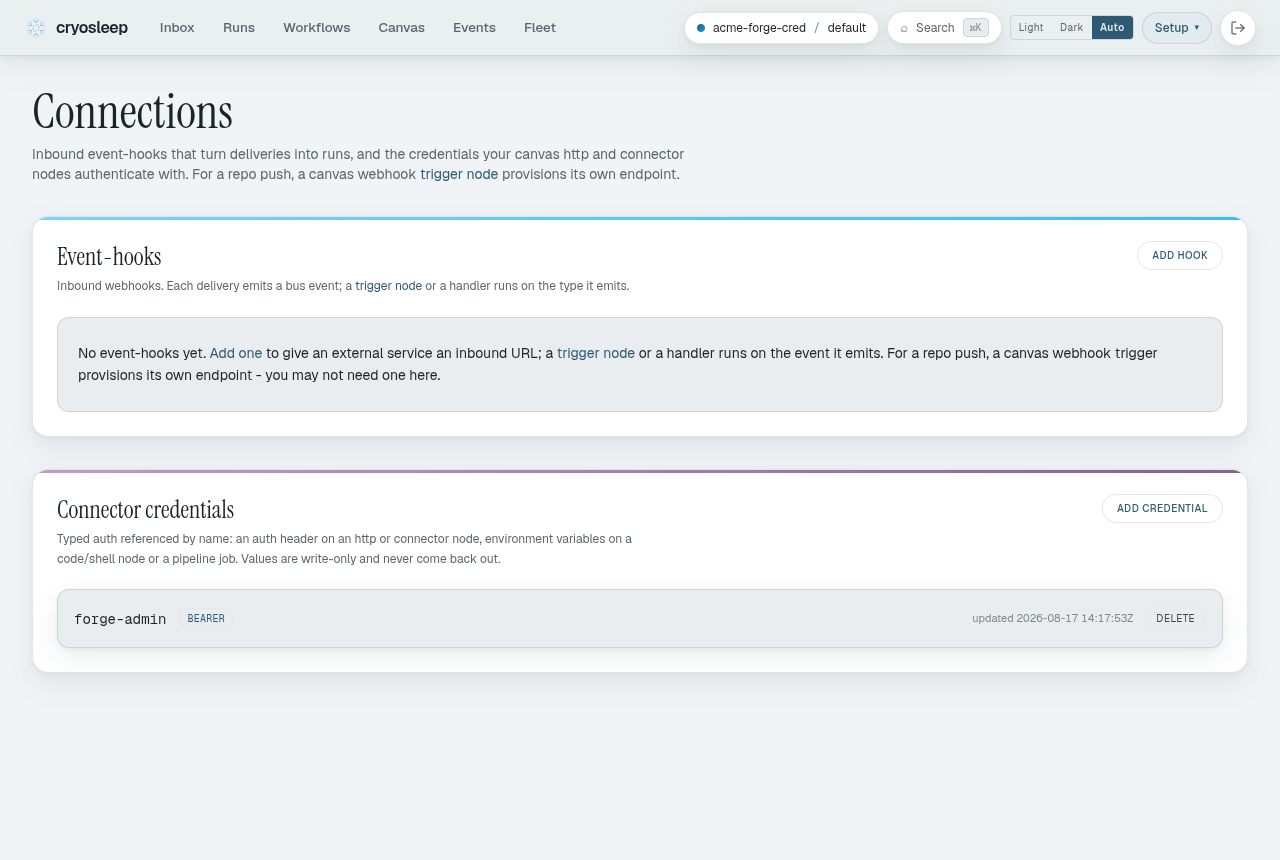
-
Publish the graph. That mints the endpoint. Select the
on_pushnode on the canvas: its inspector now shows an ingest URL, the signing secret (once), and a register on forge button.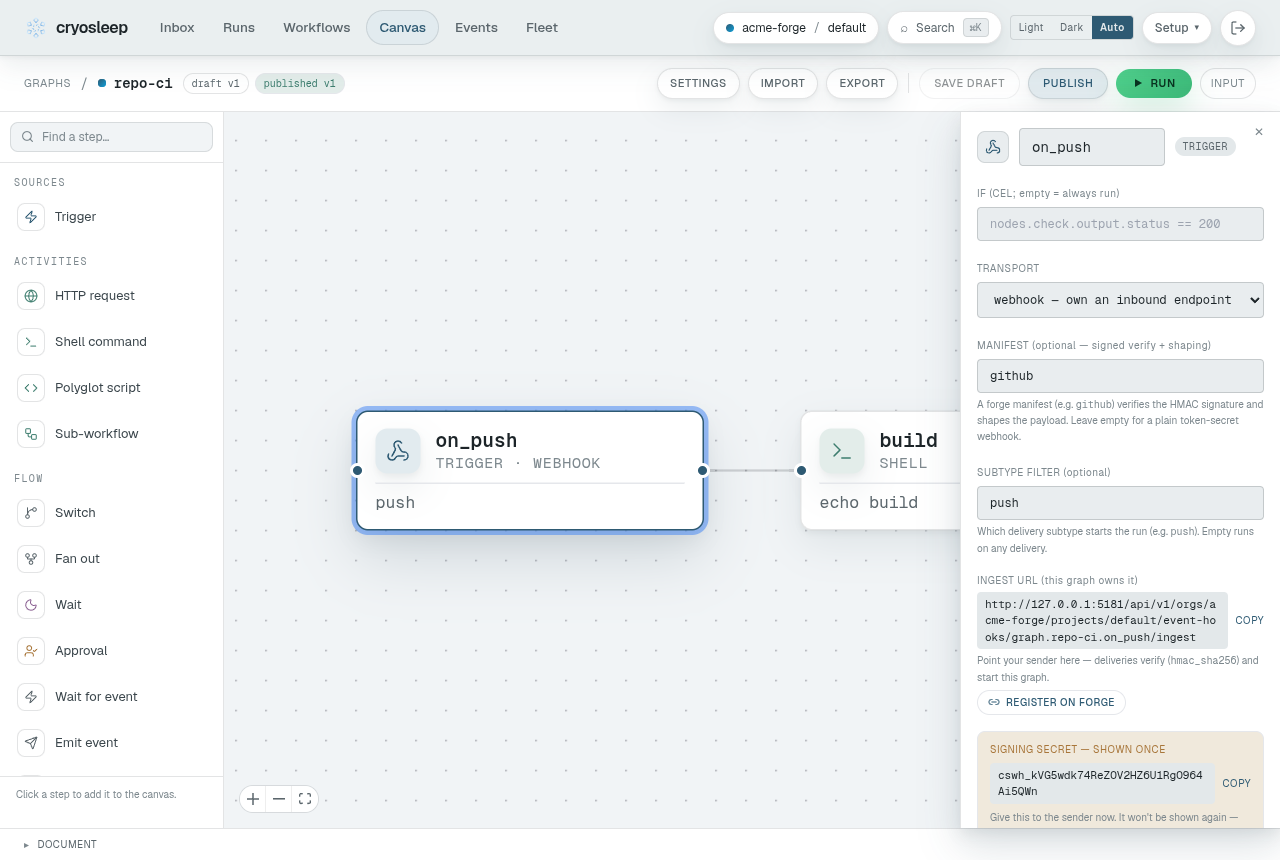
-
Register on forge. The button opens a short form. Pick the forge, enter the repo as
owner/name, and choose the credential from step 1. cryosleep creates the webhook on the repo - nothing to paste.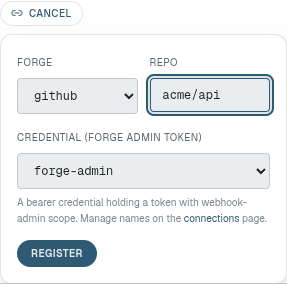
Gitea and Forgejo ask for one more thing: the instance API base, since there’s no single address to assume. It’s your instance URL plus
/api/v1.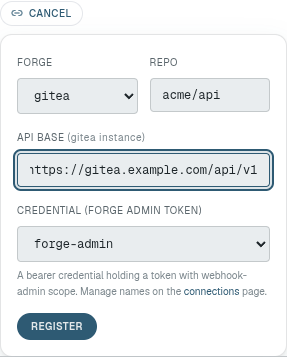


Re-registering is idempotent: it updates the existing hook rather than adding a second one, which is what you want after rotating a secret.
The API base has to be an https address that resolves to a public host,
since registering sends your forge token to it. A forge on a private
network is reachable only on a self-hosted deployment, where the operator
names it in CRYOSLEEP_FORGE_API_ALLOWLIST.
Or add it by hand
Section titled “Or add it by hand”Publish the graph, then copy the ingest URL and secret from the on_push
trigger’s inspector - the same panel pictured in step 2 above. In your
repo’s Settings -> Webhooks, add a webhook with that URL as the
payload URL, content type application/json, the secret, and the push
event. No forge token is involved, so this is the path when you can’t or
won’t hand one over.
The secret is shown once. A re-publish keeps the same one, so you only see it again if you rotate.
Either way, deliveries are verified against the secret
(X-Hub-Signature-256 HMAC) and deduped on the signed body, so a
redelivered push resolves to the event the first one created rather than
starting a second run.
Check it worked
Section titled “Check it worked”Push something. You should get two runs: the graph, and the pipeline it routed to nested under it. If nothing appears at all, the delivery didn’t reach the endpoint or failed verification - the forge’s own webhook page shows the response code it got.
Redeliver is for a delivery that failed, not for a re-test. Because the dedup is on the body, redelivering a push that already succeeded returns the same event and starts nothing - it looks like nothing happened, and nothing is meant to. Redeliver when the forge shows a non-2xx response: no run was created then, so the retry makes one. To exercise the path again, push again.
One graph, many repos
Section titled “One graph, many repos”Point several repos at the same trigger and you run one CI graph for
all of them - no per-repo copy. Each push carries the repo as its
subject, so the run knows which repo
it’s building (it’s in the input), and any cancel_on: [pr.closed] in
that run correlates to that repo’s PRs automatically. Ten repos, one
graph, and a closing PR on one never cancels a build for another.
Where the repo comes from
Section titled “Where the repo comes from”There is no “connected repo”. A project doesn’t belong to a repo, and nothing stores which one it builds. That surprises people once, and then explains the rest of this page, so it’s worth a minute.
The repo reaches a run one of two ways, and both of them carry it in.
A push carries it. A delivery arrives at a webhook you registered.
What that webhook stores is an event type and how a delivery proves
itself - the shared secret, the signature scheme - and nothing about a
repo. The manifest shapes the incoming body into an
envelope with repo, ref, sha, sender and paths, and that
envelope becomes the run’s input. So the repo a push builds is whatever
the delivery said it was, read back out as ${{ input.repo }} or
$CI_TRIGGER_REPO. One webhook happily serves many repos; the run knows
which one because the payload told it.
A request names it. cryo submit --repo-path and a from_repo:
node both take repo and credential explicitly. Nothing is looked up,
because there is nothing to look up.
What a project does store is credentials by name, webhooks, handlers,
schedules and graphs. A credential named gh-read is a token you can
point at any repo it can read - it isn’t bound to one, which is why
--repo and --repo-credential are separate flags rather than one
setting.
The practical consequence: pointing CI at a different repo is a change to the request or the payload, never to project configuration. There is no page to visit and nothing to migrate.
What a pipeline run sees
Section titled “What a pipeline run sees”Each run carries what started it as its canonical input:
${{ input.<field> }}in a pipeline - the trigger envelope as an expression scope. Uncapped:${{ input.payload.head_commit.message }}reaches into a full push body.$CRYO_INPUT_FILEin any job, shell step orscript:alike - a file holding that same envelope, whole, whatever its size.CI_TRIGGER_*env vars for the scalar fields, so a shell can branch without parsing JSON:EVENT,SHA,SHORT_SHA,REF,REPO,SENDER,FORGE. A field that isn’t a scalar (paths,payload) has no flat form and stays in the file.
A job that clones the repo can check out the exact pushed commit:
git clone "$CI_TRIGGER_REPO" app && cd appgit checkout "$CI_TRIGGER_SHA"When templating a shell body, read the env var inside the script
("$CI_TRIGGER_REF" is quoted by the shell) rather than splicing
${{ env.CI_TRIGGER_* }} into the script text, where a branch or sender
name would land unescaped.
Gate a push in YAML
Section titled “Gate a push in YAML”If you drive CI straight from a YAML pipeline instead of a graph, its
top-level if: is evaluated server-side at ingestion, before any agent
starts. When it’s false the push is acknowledged and nothing runs:
if: 'event.ref == "refs/heads/main" || event.ref.startsWith("refs/heads/release/")'The trigger fields available to if: are in the
YAML reference. A
manual submit has no trigger predicate and always runs.
Push and cryo submit --repo-path are two ways to start the same run.
Neither reads a stored setting: the push carries its repo in the
delivery, the submit names one, and either way the definition comes out
of the repo rather than off the server.